Drill into the detail
Open a category to explore the breakdown beneath it.
Explore PieChartFor teams building AI-powered BI and analytics SaaS
Embed interactive ZoomCharts visuals in your SaaS so users can drill down, zoom and filter results without writing another prompt for every follow-up.
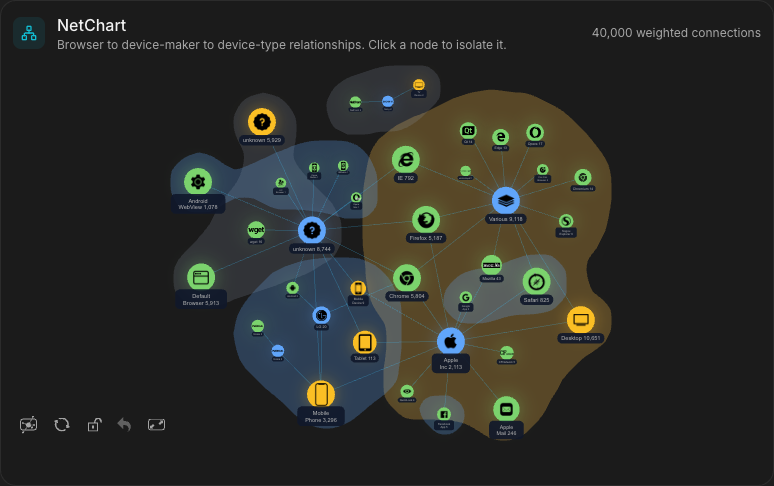
Select a time range, click a slice or choose a node to explore the connected views.
Interactive charts initialize when JavaScript is available. Open full demo
Web traffic sample data. Demonstrates interactive exploration and linked filtering.
Give users a direct way to investigate the results already in front of them. These interactive JavaScript charts become part of your product's own workflows, alongside the summaries, metrics and records your application provides. Choose the chart that fits the question and the shape of your data. A customer investigating a traffic change can narrow the date range, inspect a browser category and follow its connected devices. The sample above illustrates that workflow using ordinary web traffic data.
Open a category to explore the breakdown beneath it.
Explore PieChartZoom or select a range to investigate a change.
Explore TimeChartSelect nodes to investigate connected entities.
Explore NetChartConnect selections to related charts, KPIs and records through your application.
Explore FacetChartKeep your backend and AI logic. Use ZoomCharts to turn the results into an interactive experience inside your product.
Produces AI and analytics results.
Maps data and coordinates filters.
Displays interactive charts your users explore directly.
Chart events let your application update related views or request more data. Another AI prompt is not required for each interaction.
Your application and backend retain responsibility for authorization, tenant isolation and the results supplied to the charts.
Yes. Your application supplies data to ZoomCharts in the required chart format. You retain your backend, AI logic and access controls. Explore developer guides
No. Users can interact directly with the charts. Your application can update loaded data or request more data from your backend without making another AI call.
Use chart events and APIs to coordinate selections through your application. Shared filter state can keep charts, KPIs and detail views aligned. Read the SDK documentation
Start a 30-day trial with a representative dataset, or contact us to discuss your integration and licensing requirements. Start 30-day trial Discuss your use case
Discuss your product and integration needs with our team, or start evaluating the SDK with your own data.